WebCodecs API
Note: This feature is available in Dedicated Web Workers.
The WebCodecs API enables web developers to encode and decode video and audio in the browser efficiently (using hardware acceleration) and with very low-level control (processing on a per-frame basis).
It is useful for web applications that do heavy media processing, or which require low-level control over the way media is encoded. This includes browser-based video and audio editing, as well as live-streaming and video conferencing.
Concepts
The WebCodecs API provides browser-native interfaces to represent raw video frames, encoded video frames, as well as raw and encoded audio.
| Video | Audio | |
|---|---|---|
| Raw | VideoFrame |
AudioData |
| Encoded | EncodedVideoChunk |
EncodedAudioChunk |
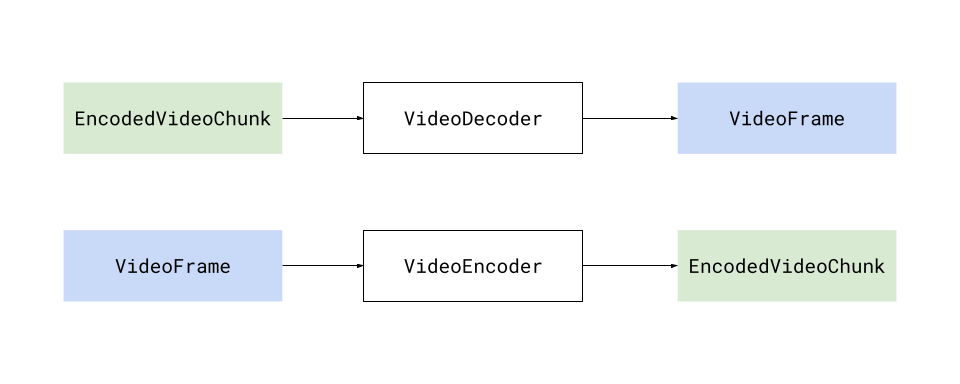
The WebCodecs API also introduces the VideoDecoder and VideoEncoder interfaces, which transform EncodedVideoChunk objects into VideoFrame objects and vice-versa.
Likewise, the WebCodecs API also introduces the AudioDecoder and AudioEncoder interfaces, which transform EncodedAudioChunk objects into AudioData objects and vice-versa.
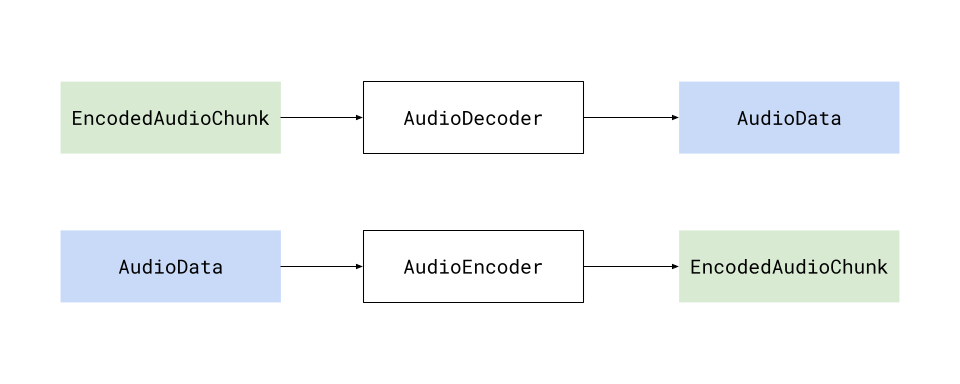
Generally there is a 1:1 correspondence between the raw and encoded versions of each media type. Decoding a number of EncodedVideoChunk objects will yield the same number of VideoFrame objects (and this is also true for audio).
Video
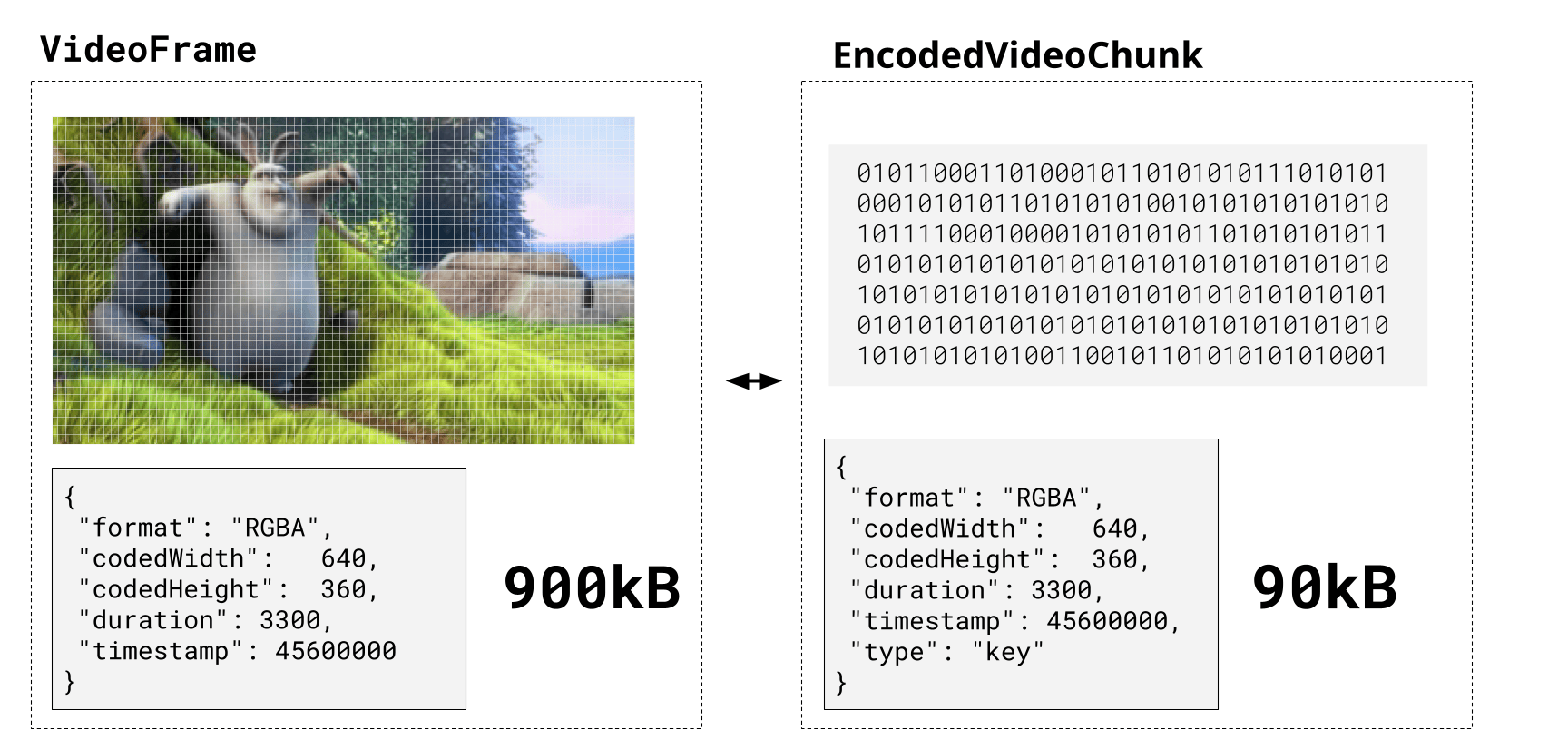
A VideoFrame represents a video frame, and is tied to actual pixel data on the device's graphics memory, as well as metadata such as the timestamp and duration (in microseconds), format and resolution. A VideoFrame can be constructed from any image source, and can also be rendered to a Canvas using any of the canvas rendering methods.
EncodedVideoChunk represents the encoded (compressed) version of the same frame, tied to binary data in regular memory and the same metadata.
The only difference is that it has one additional field: type, which can be "key" or "delta", representing whether or not it corresponds to a key frame. An EncodedVideoChunk typically stores 10 to 100 times less data than its corresponding raw VideoFrame.
Audio
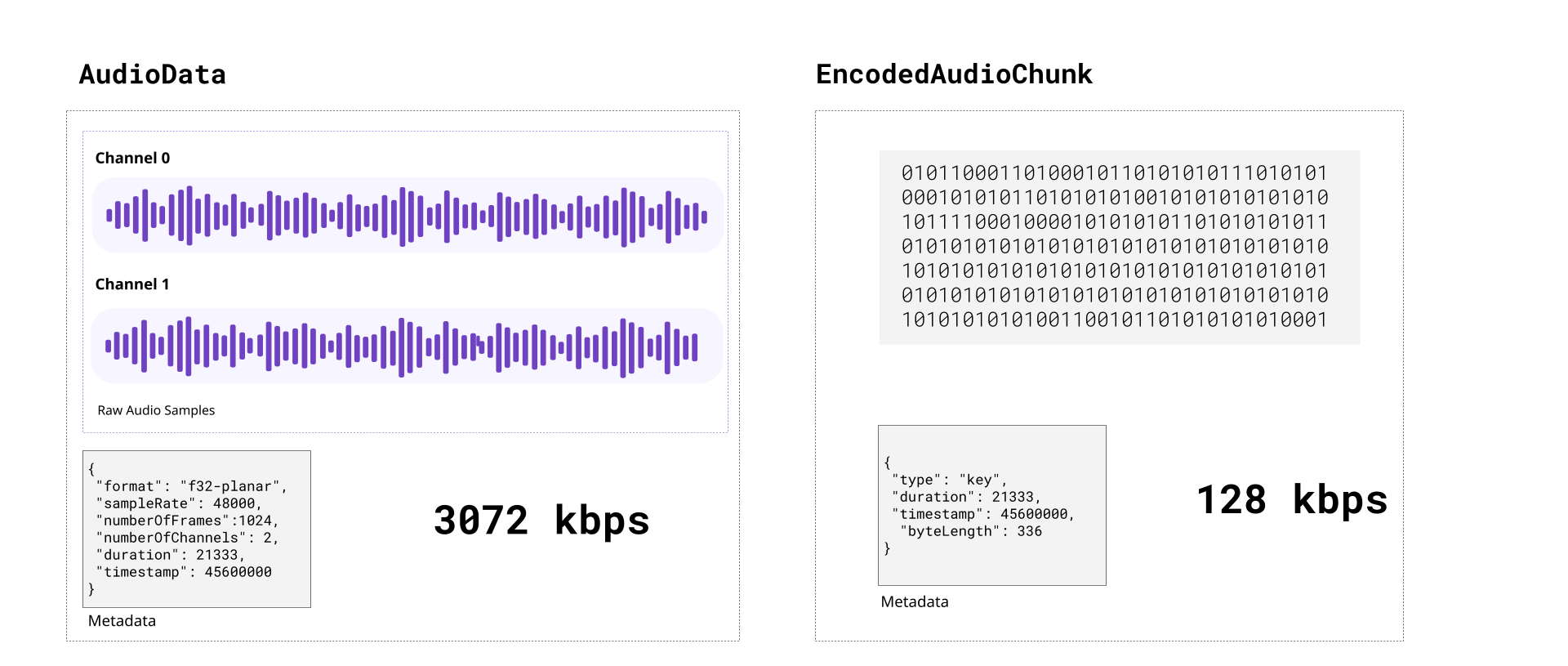
An AudioData object represents a number of individual audio samples (1024 is a typical number). Audio sample data can be extracted as a Float32Array via the copyTo method. There is no direct integration with the Web Audio API; however, the extracted Float32Array samples can be copied directly into an AudioBuffer for playback.
Likewise, the EncodedAudioChunk represents the encoded (compressed) version of an AudioData object, containing compressed audio sample data.
Processing model
The WebCodecs API uses an asynchronous processing model. Each instance of an encoder or decoder maintains an internal, independent processing queue. When queueing a substantial number of encoded chunks for decoding or frames/samples for encoding, it's important to keep this model in mind.
Methods named configure(), encode(), decode(), and flush() operate asynchronously by appending control messages to the end of the queue, while methods named reset() and close() synchronously abort all pending work and purge the processing queue. After reset(), more work may be queued following a call to configure(), but close() is a permanent operation. These methods work for both Audio and Video decoders/encoders.
The flush() method can be used to wait for the completion of all work that was pending at the time flush() was called. However, it should generally only be called once all desired work is queued — it is not intended to force progress at regular intervals. Calling it unnecessarily will affect encoder quality and cause decoders to require the next input to be a key frame.
Codecs
A codec is a specific algorithm for encoding (compressing) and decoding (decompressing) video and audio. There are several industry standard codecs for video, and a separate set of codecs for audio. Here are the major ones supported by the WebCodecs API:
Video codecs
- H.264 (AVC)
-
The most widely supported video codec. Most MP4 files use H.264.
- VP9
-
Open source, developed by Google. Better compression than H.264. Commonly used on YouTube and in WebM files.
- AV1
-
The newest open source codec, with better compression than VP9. Broad decoder support; hardware encoder support is still limited.
- H.265 (HEVC)
-
Better compression than H.264, but with significant gaps in browser support outside of Apple platforms.
Audio codecs
- Opus
-
Open source, low-latency. The recommended choice for most WebCodecs audio encoding.
- AAC
-
Widely supported. Common in MP4 files.
- MP3
-
Broadly supported for decoding, but not available as an encoder in WebCodecs.
- PCM
-
Uncompressed audio. No quality loss, but large file sizes.
The WebCodecs specification supports a particular set of codecs, and individual devices and browsers may only support a subset of those. Encoders and decoders must be configured with fully specified codec strings (such as "vp09.00.40.08.00" for VP9 or "avc1.4d0034" for H.264) instead of ambiguous codec names like "vp9" or "h264". The Codec selection guide provides guidance on choosing an appropriate codec string (see the Codec Support Table (webcodecsfundamentals.org) for a complete list of codec strings and their browser support).
Muxing and demuxing
The WebCodecs API only deals with encoding and decoding, with encoded chunks just representing binary data. It does not provide a built-in way to read EncodedVideoChunk objects from a video file, or write them to a playable video file.
Reading encoded chunks from a video file is a completely different process called demuxing, and to fetch EncodedVideoChunk objects from a video file, you will need to use a demuxing library such as Mediabunny or web-demuxer.
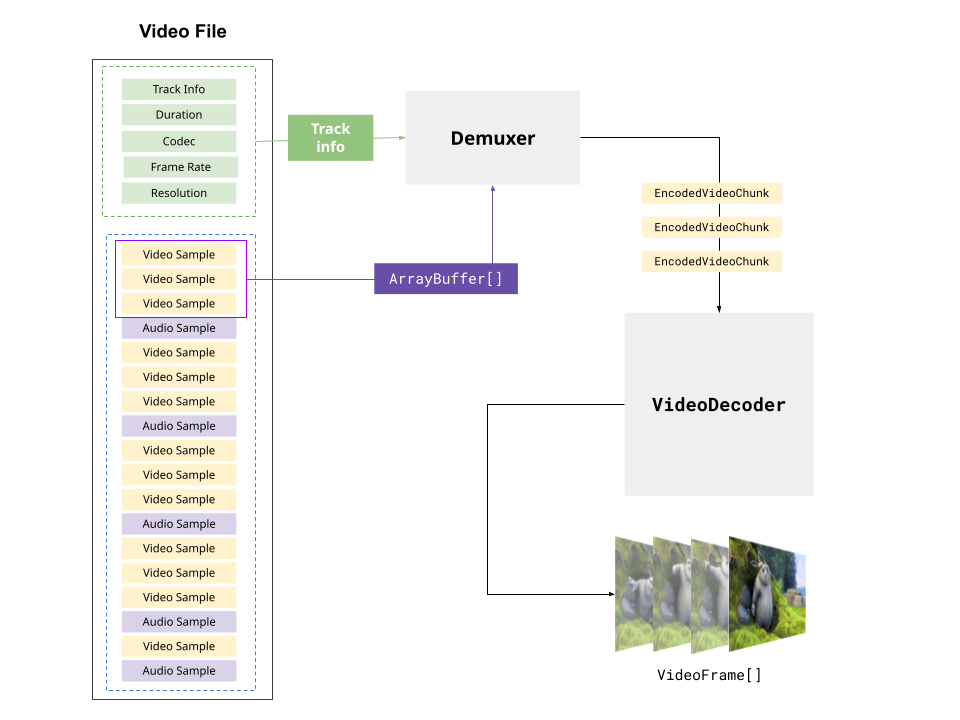
These libraries will follow the video container specifications (e.g., webm, mp4) to extract the track data and byte offsets for each encoded chunk, and provide methods for extracting the actual chunks from the raw file.
Likewise, to write to a playable video file, you will need a muxing library, with Mediabunny being the primary option. Muxing libraries handle formatting the binary encoded data, and placing it in the correct byte position in the output file stream according to the container specification, so that the output video is playable.
You can find more information on muxing and demuxing in the Muxing and Demuxing guide (webcodecsfundamentals.org).
Guides
- Video processing concepts
-
A brief primer on video processing, covering codecs and containers, muxing and demuxing, and conceptual information that explains how the WebCodecs API implements these concepts.
- Using the WebCodecs API
-
In depth guide to how to actually use the WebCodecs API, including how to instantiate and configure encoders and decoders, how to create and consume video frames, and how to extract samples from
AudioData. - Codec selection
-
The WebCodecs API requires codec strings — precise identifiers that specify not just the codec family but also the profile, level, and other parameters. This guide explains how codec strings work and how to choose the right codec for common use cases.
Interfaces
AudioDecoder-
Decodes
EncodedAudioChunkobjects. VideoDecoder-
Decodes
EncodedVideoChunkobjects. AudioEncoder-
Encodes
AudioDataobjects. VideoEncoder-
Encodes
VideoFrameobjects. EncodedAudioChunk-
Represents codec-specific encoded audio bytes.
EncodedVideoChunk-
Represents codec-specific encoded video bytes.
AudioData-
Represents unencoded audio data.
VideoFrame-
Represents a frame of unencoded video data.
VideoColorSpace-
Represents the color space of a video frame.
ImageDecoder-
Unpacks and decodes image data, giving access to the sequence of frames in an animated image.
ImageTrackList-
Represents the list of tracks available in the image.
ImageTrack-
Represents an individual image track.
Examples
Basic usage
To instantiate a VideoEncoder, we pass an object that specifies a callback function that will be called when EncodedVideoChunk instances are available for processing, and an error function that will be called if there are errors.
This is shown in the following code:
const encoder = new VideoEncoder({
  output(chunk, meta) {
    // Do something with chunk, typically send to muxing library
  },
  error(e) {
    console.warn(e);
  },
});
You then need to configure the encoder with the codec parameter and various other fields.
encoder.configure({
  codec: "vp09.00.40.08.00", // See codec selection guide
  width: 1280,
  height: 720,
  bitrate: 1_000_000, // 1 Mbps
  framerate: 30,
});
You can then start encoding frames to the encoder. You can construct a VideoFrame from a Canvas.
for (let i = 0; i < 60; i++) {
  const frame = new VideoFrame(canvas, { timestamp: (i * 1e6) / 30 }); // 30 fps, in microseconds
  encoder.encode(frame, { keyFrame: i % 60 === 0 });
}
See Using the WebCodecs API for more examples.